




In this guide
- What the service actually is
- Who buys this
- The tools, and what to check first
- Honesty rules you must follow
- A simple workflow, step by step
- Useful prompts and instructions
- Packages and honest pricing
- Notes for beginners in Pakistan
- A realistic 30-day plan
- Common mistakes to avoid
- Frequently asked questions
- Final thoughts
Empty rooms are hard to sell or rent online. Buyers and tenants scroll quickly, and a bare room with white walls gives them little sense of size or use. For years, agents have used virtual staging, where furniture is added digitally to photos, but it usually meant hiring a 3D artist. AI tools have made this much faster, and in November 2026 two launches pushed it further.
On November 12, 2026, Pieter Levels added a video-to-3D feature to Interior AI: you upload a phone walkthrough video of a room or floor and it creates a walkable 3D space where you can paint walls, move furniture and view a floor plan. The same day, World Labs opened its Atlas world model to everyone, with browser apps that turn photos into explorable 3D scenes and export them as videos or 3D files. This guide explains how a beginner can turn these tools into a careful, honest service for property listings. It does not promise income, and both tools are new, so features and prices can change quickly.
What the service actually is
You help property marketers present spaces better, using AI to create:
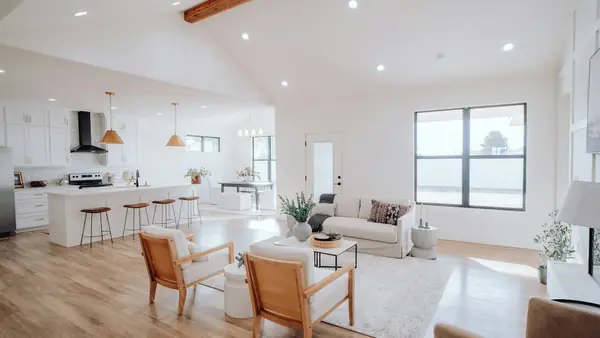
- Virtually staged photos: empty rooms furnished digitally in a suitable style, keeping walls, windows and floors as they really are.
- Style options: the same room shown in two or three styles so a buyer can imagine different uses, such as a study or a guest room.
- Short walkthrough or flythrough videos: camera paths through a space for listing pages and social media.
- Simple 3D previews and floor plan sketches to give a sense of layout, clearly labelled as illustrations, not measured plans.
Your value is not pressing a button. It is choosing sensible styles, fixing AI mistakes, keeping the property honest and delivering clean, labelled files on time.
Who buys this
- Real estate agents with empty or poorly furnished listings.
- Landlords and property managers renting unfurnished flats.
- Small developers marketing new units before furniture arrives.
- Short-stay hosts and furniture shops who want to show room ideas.
- Interior designers who want quick concept visuals before detailed work.
The tools, and what to check first
Interior AI (interiorai.com) redesigns room photos in many preset styles and has a Virtual Staging mode that furnishes empty rooms while keeping the structure. Its new video-to-3D feature builds a walkable space from a phone video, and its site describes walkthrough and flythrough video options. It is a paid subscription, and according to its pricing page at the time of writing, features like virtual staging, editing and walkthrough videos sit on higher plans. Check current plans before you buy, and note the site states it does not offer refunds.
World Labs Atlas (worldlabs.ai) offers Viewfinder, which reconstructs a scene from one photo or several overlapping photos and lets you render camera paths, and Chisel, which builds scenes from simple blocked-out shapes. Outputs can be exported as keyframes, video clips or 3D Gaussian splats, and there is an API and Blender support. Atlas uses credits; launch coverage reported 1,000 credits per US dollar and about $5 for a refined 3D reconstruction, with some prices only shown in the app.
The most important check: commercial rights. Launch coverage of World Labs' terms reported that outputs made on a free account belong to World Labs and are licensed only for personal, non-commercial use, while paid users own their outputs. If you deliver client work, use a paid plan or purchased credits and read the current terms yourself. Do the same for every tool you use.
Honesty rules you must follow
Virtual staging is widely accepted in property marketing, but only when it does not mislead. Build these rules into every job:
- Label staged images clearly, for example "Virtually staged" on the image or in the caption. Many listing portals and local rules expect this, so check what applies where your client advertises.
- Never change the property itself. Do not remove cracks, damp patches, wires, poles or neighbouring buildings, change window views, or make rooms look bigger than they are.
- Keep an original photo alongside each staged one when the listing allows it.
- Do not present AI floor plans as measured plans. Label them as illustrations.
- Respect privacy. Remove personal photos, documents and faces from walkthrough videos before uploading them to any tool, and only process properties the client has the right to market.
A simple workflow, step by step
- Brief: ask for photos or a walkthrough video, the target buyer or tenant, preferred style and where the images will be published.
- Check inputs: straight, bright, wide photos work best. If photos are dark or tilted, send the client a short shooting guide (landscape orientation, lights on, phone at chest height, slow steady walk for video).
- Generate options: create two or three styles per room in your chosen tool.
- Quality check: zoom in on every image. Look for floating furniture, warped door frames, extra windows, odd shadows and furniture blocking doors. Regenerate or edit until it looks believable and true to the room.
- Walkthroughs: build the 3D space or camera path, keep movement slow and smooth, and trim any frames with visual glitches.
- Label and export: add the "Virtually staged" label, export in sizes the listing site needs, and name files clearly (for example "flat-12-lounge-staged-modern.jpg").
- Deliver: share a folder with originals, staged versions and videos, plus a short note about what was changed.
Useful prompts and instructions
- "Stage this empty living room in a warm modern style for a young family. Keep the walls, windows, floor and doors exactly as they are. Furniture must fit the real room size."
- "Create a calm home office version of this small bedroom with a desk, chair and shelves. Do not add windows or change the ceiling."
- For listing text: "Write a 60-word caption for a virtually staged two-bedroom flat. Mention that images are virtually staged. Do not exaggerate size or features."
Packages and honest pricing
Price by output rather than by hour, and include your tool costs. Example structures:
- Starter: a fixed number of staged photos in one style, one revision round.
- Listing pack: staged photos for every main room, two styles for the living area, plus a short walkthrough video.
- Monthly agent plan: a set number of rooms per month for agents with regular listings.
Check what similar services charge on freelance platforms in your target market, start a little lower while you build a portfolio, and raise prices as reviews come in. Do not promise faster sales or higher prices; you are improving presentation, not guaranteeing results.
Notes for beginners in Pakistan
Property portals and agents in Pakistan increasingly market online, and many international agents hire remote freelancers for image work. You can serve both. Build samples using photos of rooms you have permission to use, such as your own home or a friend's flat (with personal items removed), and never use listing photos from portals without permission. For international clients, learn basic labelling rules in their country and deliver on their working hours. Tool subscriptions are billed in dollars, so start with one tool and add more only when paid work justifies it.
A realistic 30-day plan
- Week 1: learn one tool deeply, read its terms on commercial use, and stage five rooms for practice.
- Week 2: build a portfolio of before-and-after pairs and one short walkthrough video, all clearly labelled.
- Week 3: create a simple service page or freelance gig and contact ten local agents or landlords with a free sample room.
- Week 4: deliver first jobs, collect feedback, refine your checklist and decide on monthly packages.
Common mistakes to avoid
- Using a free plan for client work when its terms restrict commercial use.
- Delivering images without a "Virtually staged" label.
- Hiding defects or changing views, which can mislead buyers and harm your client.
- Choosing styles that do not fit the market, such as luxury furniture in a budget rental.
- Skipping the zoom-in quality check.
Frequently asked questions
Do I need 3D design experience?
No, but a good eye for space and light helps. Start with photo staging before walkthroughs.
Can AI floor plans replace a surveyor?
No. Treat them as rough illustrations and label them that way.
Which tool should I start with?
Pick one that covers your first service, usually photo staging, and confirm it allows commercial use on the plan you pay for.
Final thoughts
AI virtual staging and new video-to-3D tools let a beginner offer a service that once needed a 3D artist. Succeed with it by being careful: use plans that allow commercial use, label every staged image, never alter the real property, check every output closely and price clear packages. Honest, polished visuals help agents and landlords present spaces well, and that is what keeps clients coming back.
This article is for general information only and is not legal or real estate advice. Tool features, pricing, terms and commercial-use rights for Interior AI, World Labs Atlas and other tools can change at any time; check each provider's official website and terms. Property advertising and disclosure rules differ by country and platform. Product names are mentioned for information only, not as endorsements. No income outcomes are guaranteed.
Keep reading